Eight Reflections
Figure R8: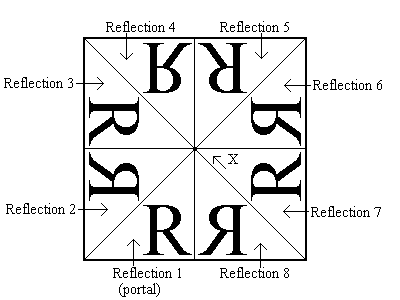
Press the Eight Reflections menu item to construct tiles using the procedure outlined in figure R8. Assume that the transparent portal is at the bottom left corner of the Silicon Mirror window and the Reflecting Glass, Single Tile View, and Fold 1 menu items are selected. If we consider the portal to be reflection 1(even though it is actually not reflected - consider it the 'NULL' reflection case), then we see that eight reflections of the portal meet at Point 'X'.
Nerd alert: In eight reflections mode, the Silicon Mirror creates tiles that are members of the ‘p4m’ crystallographic wallpaper group.